This section identifies the IP address and/or domain name and their relative activity level on the site. If you do not use WebTrends cookies to track visits on the site, WebTrends cannot differentiate between hits from different visitors of a same IP.
Hits - Number of hits from the specified visitor. A hit is a single action on the Web server as it appears in the log file. A visitor downloading a single file is logged as a single hit, while a visitor requesting a Web page including two images registers as three hits on the server; one hit is the request for the .html page, and two additional hits are requests for the downloaded image files. While the volume of hits is an indicator of Web server traffic, it is not an accurate reflection of how many pages are being looked at.
Visitor - If cookies are enabled, this column will display the cookie from the specified visitor. If cookies are not enabled, and the IP address of the visitor can be resolved, this column will display the resolved IP address of the specified visitor. Otherwise, this column will display the non-resolved IP address of the visitor.
Visits - Number of times the specified visitor visited your Web site.
% - Percentage of hits from the specified visitor.
Use this information to find out which individuals visit your site the most and how frequently they visit.
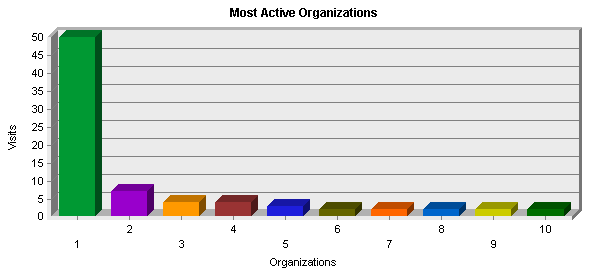
Hits - Number of hits to your site from the specified organization. A hit refers to a single action on the Web server as it appears in the log file. A visitor downloading a single file is logged as a single hit, while a visitor requesting a Web page including two images registers as three hits on the server; one hit is the request for the .html page, and the two additional hits are requests for the downloaded image files. While the volume of hits is an indicator of Web server traffic, it is not an accurate reflection of how many pages are being looked at.
Organizations - If GeoTrends is enabled, the name of the company or organization is found by looking up the visitor's IP address in the GeoTrends databse. If DNS domain name resolution is enabled and the domain name for this IP address is found, the domain name will be shown. If neither GeoTrends nor DNS resolution is enabled, only IP addresses are shown.
Subtotal - Sum of all data rows for each listed organization.
Total - Sum of the subtotal and all data that does not appear on the page.
Visits - Number of visits to your site from the specified organization. If a visitor is idle longer than the idle-time limit, WebTrends assumes the visit was voluntarily terminated. If the visitor continues to browse your site after they reach the idle-time limit, a new visit is counted. The default idle-time limit is thirty minutes.
% - Percentage of total hits from a visitor inside the specified organization.
Determine how your Web site can be improved according to how businesses use your site. Consider how your product can be made more attractive to organizations that have shown interest.

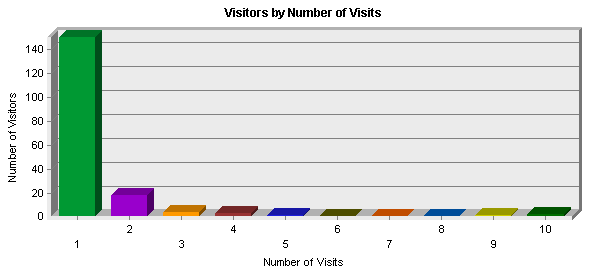
 1 visit
 2 visits
 3 visits
 4 visits
 5 visits
 6 visits
 7 visits
 8 visits
 9 visits
 10 or more visits


 11
11![[NetIQ Corporation]](./wtlogoss.gif)