Summary of Activity for Report Period Help
This page summarizes general server activity.

Summary of Activity for Report Period
Average Number of Visits per Day on Weekdays 53
Average Number of Hits per Day on Weekdays 1,047
Average Number of Visits per Weekend 63
Average Number of Hits per Weekend 709
Most Active Day of the Week Thu
Least Active Day of the Week Sat
Most Active Date January 24, 2008
Number of Hits on Most Active Date 2,492
Least Active Date January 13, 2008
Number of Hits on Least Active Date 121
Most Active Hour of the Day 11:00-11:59
Least Active Hour of the Day 02:00-02:59

Summary of Activity for Report Period - Help Card Start of Chapter

Average Number of Hits (per day on weekdays) - The average number of hits for each individual day of the week.

Average Number of Hits (per weekend) - The average number of hits for both Saturdays and Sundays combined.

Average Number of Visits (per day on weekdays) - The average number of visits for each individual day of the week.

Average Number of Visits (per weekend) - The average number of visits for both Saturdays and Sundays combined.

Least Active Date - The least active date in the report period.

Least Active Day of the Week - If the report period is for one week or less, the Least Active Day of the Week will tell you which specific day was least active during that week. If the report period is for more than one week, the Least Active Day of the Week will tell you which day of the week that has the smallest amount of activity on average.

Least Active Hour of the Day - The least active hour of the day after activity for all hours is added up. This is not an average.

Most Active Date - The most active date in the report period.

Most Active Day of the Week - If the report period is for one week or less, the Most Active Day of the Week will tell you which specific day was most active during that week. If the report period is for more than one week, the Most Active Day of the Week will tell you which day of the week that has the largest amount of activity on average.

Most Active Hour of the Day - The most active hour of the day after activity for all hours is added up. This is not an average.


This table is useful for determining the best day of the week to perform system maintenance.

 Summary of Activity by Time Increment Help
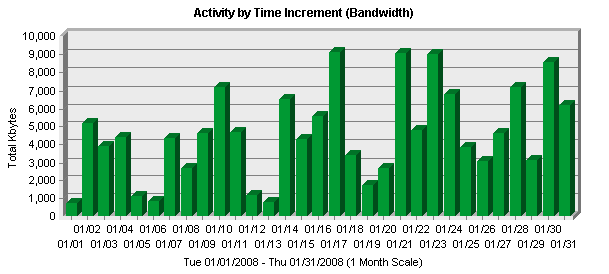
This page helps you understand the bandwidth requirements of your site.

Summary of Activity by Time Increment
Time Interval
Hits
Page Views
Kbytes
Visits
Tue 01/01/2008 122 32 755 K 34
Wed 01/02/2008 870 113 5,192 K 82
Thu 01/03/2008 619 111 3,914 K 48
Fri 01/04/2008 858 109 4,432 K 50
Sat 01/05/2008 200 38 1,143 K 35
Sun 01/06/2008 124 34 872 K 34
Mon 01/07/2008 737 88 4,380 K 43
Tue 01/08/2008 632 80 2,690 K 54
Wed 01/09/2008 1,019 129 4,616 K 62
Thu 01/10/2008 916 147 7,173 K 56
Fri 01/11/2008 642 111 4,680 K 43
Sat 01/12/2008 178 49 1,182 K 37
Sun 01/13/2008 121 41 809 K 30
Mon 01/14/2008 1,183 143 6,517 K 45
Tue 01/15/2008 748 138 4,329 K 49
Wed 01/16/2008 851 129 5,608 K 76
Thu 01/17/2008 1,771 221 9,149 K 46
Fri 01/18/2008 786 143 3,433 K 54
Sat 01/19/2008 267 44 1,768 K 30
Sun 01/20/2008 494 77 2,692 K 27
Mon 01/21/2008 1,522 255 9,058 K 74
Tue 01/22/2008 837 132 4,805 K 46
Wed 01/23/2008 1,748 186 9,015 K 68
Thu 01/24/2008 2,492 240 6,786 K 62
Fri 01/25/2008 1,047 116 3,881 K 38
Sat 01/26/2008 746 91 3,103 K 39
Sun 01/27/2008 707 80 4,660 K 21
Mon 01/28/2008 1,333 192 7,168 K 67
Tue 01/29/2008 698 79 3,161 K 42
Wed 01/30/2008 1,659 191 8,569 K 57
Thu 01/31/2008 1,010 162 6,206 K 35
Total 26,937 3,701 141,746 K 1,484

Summary of Activity by Time Increment - Help Card Start of Chapter

Hits - Number of hits to your site during the specified time interval. A hit is a single action on the Web server as it appears in the log file. A visitor downloading a single file is logged as a single hit, while a visitor requesting a Web page including two images registers as three hits on the server; one hit is the request for the .html page, and two additional hits are requests for the downloaded image files. While the volume of hits is an indicator of Web server traffic, it is not an accurate reflection of how many pages are being looked at.

Kbytes - Number of kilobytes of data transferred from your server to your visitors during the specified time interval.

Page Views - Hits to files designated as pages. Supporting graphics and other non-page files are not counted.

Time Interval - A one-year report displays monthly time increments. A one-month report displays daily time increments. And a daily report displays hourly time increments.

Visits - Number of visitors to your site during the specified time interval. If a visitor is idle longer than the idle-time limit, WebTrends assumes the visit was voluntarily terminated. If the visitor continues to browse your site after they reach the idle-time limit, a new visit is counted. The default idle-time limit is thirty minutes.


Periods of less activity should be considered for maintenance and content improvement.

 Activity Level by Day of the Week Help
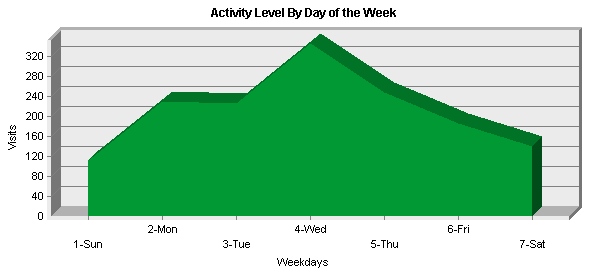
This page shows the activity for each day of the week within the reporting period. Unsuccessful hits are not included.

Activity Level by Day of the Week
 
Day
Hits
% of Total Hits
Visits
1
Sun 1,446 5.36% 112
2
Mon 4,775 17.72% 229
3
Tue 3,037 11.27% 225
4
Wed 6,147 22.81% 345
5
Thu 6,808 25.27% 247
6
Fri 3,333 12.37% 185
7
Sat 1,391 5.16% 141
Total Weekdays 24,100 89.46% 1,231
Total Weekend 2,837 10.53% 253

Activity Level by Day of the Week - Help Card Start of Chapter

Day - Specified day of the week being tracked.

Hits - Number of hits on the specified day of the week. If the report period is longer than one week, and there are, for example, two Mondays, the value represented includes the combined total of both Mondays. Unsuccessful hits are not counted. A hit is a single action on the Web server as it appears in the log file. A visitor downloading a single file is logged as a single hit, while a visitor requesting a Web page including two images registers as three hits on the server; one hit is the request for the .html page, and two additional hits are requests for the downloaded image files. While the volume of hits is an indicator of Web server traffic, it is not an accurate reflection of how many pages are being looked at.

Visits - Number of visits on the specified day of the week. If the report period is longer than one week, and there are, for example, two Mondays, the value represented includes the combined total of both Mondays. Unsuccessful hits are not counted. If a visitor is idle longer than the idle-time limit, WebTrends assumes the visit was voluntarily terminated. If the visitor continues to browse your site after they reach the idle-time limit, a new visit is counted. The default idle-time limit is thirty minutes. This time limit can be changed by the system administrator.

% - Percentage of total hits that occurred on the specified day of the week.


Days of less activity should be considered good days for maintenance and content improvement.

 Activity Level by Hour of the Day Help
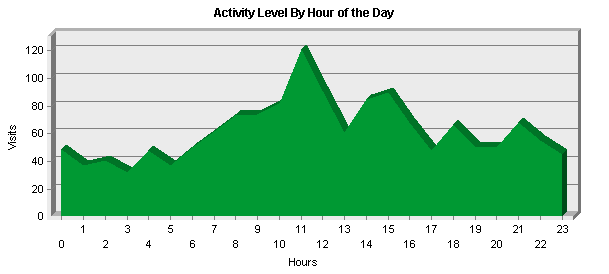
This page shows activity for each hour of the day.

Activity Level by Hours Details
Hour
# of Hits
% of Total Hits
# of Visits
00:00 - 00:59 234 0.86% 49
01:00 - 01:59 183 0.67% 37
02:00 - 02:59 146 0.54% 41
03:00 - 03:59 162 0.6% 32
04:00 - 04:59 294 1.09% 48
05:00 - 05:59 200 0.74% 37
06:00 - 06:59 624 2.31% 50
07:00 - 07:59 557 2.06% 62
08:00 - 08:59 1,383 5.13% 73
09:00 - 09:59 1,753 6.5% 74
10:00 - 10:59 2,265 8.4% 82
11:00 - 11:59 3,375 12.52% 121
12:00 - 12:59 2,805 10.41% 91
13:00 - 13:59 1,780 6.6% 61
14:00 - 14:59 1,648 6.11% 85
15:00 - 15:59 1,950 7.23% 90
16:00 - 16:59 1,309 4.85% 68
17:00 - 17:59 1,037 3.84% 48
18:00 - 18:59 1,244 4.61% 67
19:00 - 19:59 1,027 3.81% 50
20:00 - 20:59 874 3.24% 50
21:00 - 21:59 815 3.02% 68
22:00 - 22:59 578 2.14% 55
23:00 - 23:59 694 2.57% 45
Total Visitors during Work Hours (8:00am-5:00pm) 18,268 67.81% 745
Total Visitors during After Hours (5:01pm-7:59am) 8,669 32.18% 739

Activity Level by Hour of the Day - Help Card Start of Chapter

Hits - Number of hits on the specified hour of the day. If the report period is longer than one day, and there are, for example, two instances of the same hour, the value represented includes the combined total of both instances. Unsuccessful hits are not counted. A hit is a single action on the Web server as it appears in the log file. A visitor downloading a single file is logged as a single hit, while a visitor requesting a Web page including two images registers as three hits on the server; one hit is the request for the .html page, and two additional hits are requests for the downloaded image files. While the volume of hits is an indicator of Web server traffic, it is not an accurate reflection of how many pages are being looked at.

Hour - Specified hour of the day being tracked.

Visits - Number of visits on the specified hour of the day. If the report period is longer than one day, and there are, for example, two instances of the same hour, the value represented includes the combined total of both instances. Unsuccessful hits are not counted. If a visitor is idle longer than the idle-time limit, WebTrends assumes the visit was voluntarily terminated. If the visitor continues to browse your site after they reach the idle-time limit, a new visit is counted. The default idle-time limit is thirty minutes. This time limit can be changed by the system administrator.

% - Percentage of total hits that occurred on the specified hour of the day.


Hours of less activity should be considered good days for maintenance and content improvement.

 Activity Level by Length of Visit Help
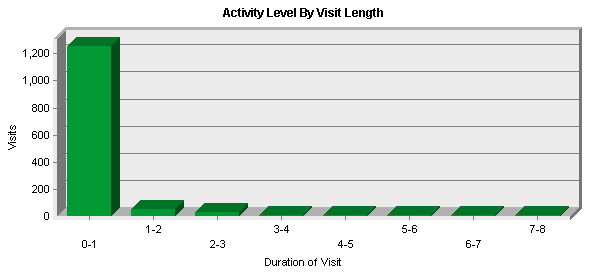
This page shows the number and percentages of visits and page views over selected visit lengths.

Activity Level by Length of Visit
Visit Duration (Minutes)
Visits
Page Views
% of Total Visits
% of Total Views
0-1 1,252 1,836 84.42% 49.62%
1-2 58 501 3.91% 13.54%
2-3 30 229 2.02% 6.18%
3-4 9 70 0.6% 1.89%
4-5 12 93 0.8% 2.51%
5-6 13 99 0.87% 2.67%
6-7 10 113 0.67% 3.05%
7-8 12 100 0.8% 2.7%
8-9 4 43 0.26% 1.16%
9-10 8 49 0.53% 1.32%
10-11 5 97 0.33% 2.62%
11-12 4 12 0.26% 0.32%
12-13 7 44 0.47% 1.18%
13-14 7 25 0.47% 0.67%
14-15 3 72 0.2% 1.94%
15-16 4 31 0.26% 0.83%
16-17 4 19 0.26% 0.51%
17-18 7 47 0.47% 1.27%
18-19 1 2 0.06% 0.05%
> 19 33 218 2.22% 5.89%
Totals 1,483 3,700 100% 100%

Activity Level by Length of Visit - Help Card Start of Chapter

Page Views - Number of page views from visitors who viewed your page for the specified duration of time.

Visit Duration (Minutes) - Number of minutes your Web site was viewed.

Visits - Number of visitors who viewed your page for the specified duration of time.

% of Total Page Views - Percentage of page views from visitors who viewed your page for the specified duration of time.

% of Total Visits - Percentage of visitors who viewed your page for the specified duration of time.


This information tells you how many visitors view your site for specific intervals of time.

 Number of Views per Visit Help
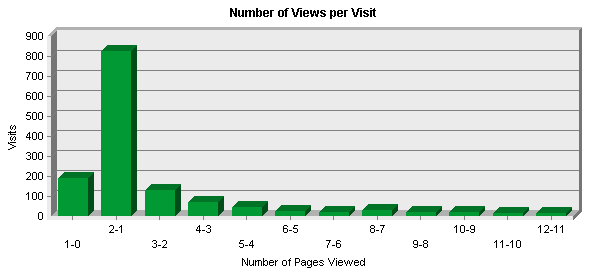
This section shows you how many visitors viewed one page, how many viewed two pages, etc.

Number of Pages Viewed per Visit
Number of Pages Viewed
Number of Visits
% of Total Visits
0 pages 194 13.08%
1 page 825 55.63%
2 pages 131 8.83%
3 pages 74 4.98%
4 pages 48 3.23%
5 pages 29 1.95%
6 pages 23 1.55%
7 pages 32 2.15%
8 pages 22 1.48%
9 pages 21 1.41%
10 pages 15 1.01%
11 or more pages 69 4.65%
Totals 1,483 100%

Number of Views per Visit - Help Card Start of Chapter

Number of Pages Viewed - The number of pages viewed, beginning with one and increasing by increments of one, being analyzed in the other columns.

Number of Visits - Number of visits by people who viewed the specified number of pages. If a visitor is idle longer than the idle-time limit, WebTrends assumes the visit was voluntarily terminated. If the visitor continues to browse your site after they reach the idle-time limit, a new visit is counted. The default idle-time limit is thirty minutes. This time limit can be changed by the system administrator.

% - Percentage of total visits by people who viewed the specified number of pages.


You can use this information to quickly find out the number and percentages of viewers who read a given number of pages on your site. If most visitors only view a few pages, it may indicate that they cannot find the content they are looking for.

 Visitors by Time Increment Help
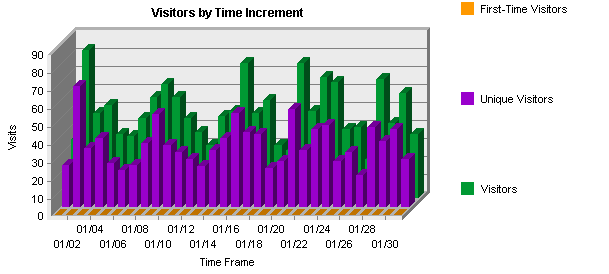
This page shows how many visitors viewed your Web site and how long they stayed. The information is split up into time increments based on the duration of the log file. Visitors are typically tracked using the cookie that's been defined or by their IP addresses.

Visitors by Time Increment
Time Frame
Visitors
Unique Visitors
First-Time Visitors
Average Visit Length
Visitor-Minutes
Tue 01/01/2008 33 24 0 0 0:04
Wed 01/02/2008 83 68 0 00:00:23 32:04
Thu 01/03/2008 48 33 0 00:01:13 59:04
Fri 01/04/2008 52 39 0 00:02:16 118:29
Sat 01/05/2008 36 25 0 00:00:06 3:38
Sun 01/06/2008 35 21 0 00:00:41 24:13
Mon 01/07/2008 45 24 0 00:01:30 67:55
Tue 01/08/2008 57 36 0 00:01:31 87:01
Wed 01/09/2008 64 52 0 00:01:45 112:05
Thu 01/10/2008 57 35 0 00:01:21 77:37
Fri 01/11/2008 45 31 0 00:01:52 84:37
Sat 01/12/2008 37 27 0 00:00:12 7:27
Sun 01/13/2008 30 23 0 00:00:08 4:16
Mon 01/14/2008 46 32 0 00:01:48 82:57
Tue 01/15/2008 49 39 0 00:00:25 20:34
Wed 01/16/2008 76 53 0 00:01:11 90:47
Thu 01/17/2008 48 42 0 00:01:52 90:02
Fri 01/18/2008 55 41 0 00:01:18 72:07
Sat 01/19/2008 30 22 0 00:00:11 5:37
Sun 01/20/2008 27 26 0 00:00:53 24:11
Mon 01/21/2008 76 55 0 00:01:48 138:01
Tue 01/22/2008 49 32 0 00:02:31 124:07
Wed 01/23/2008 68 44 0 00:02:10 148:01
Thu 01/24/2008 65 46 0 00:02:55 190:35
Fri 01/25/2008 39 26 0 00:02:35 100:48
Sat 01/26/2008 40 31 0 00:01:25 56:57
Sun 01/27/2008 22 18 0 00:03:09 69:18
Mon 01/28/2008 67 45 0 00:01:29 99:52
Tue 01/29/2008 42 37 0 00:01:09 48:36
Wed 01/30/2008 59 44 0 00:01:52 110:20
Thu 01/31/2008 36 27 0 00:01:44 62:59
Averages NA NA NA 00:01:23 71:25
Totals NA NA NA 00:43:23 2214:19

Visitors by Time Increment - Help Card Start of Chapter

Visitors - Number of times a visitor came to your site during the specified time frame. If a visitor is idle longer than the idle-time limit, WebTrends assumes the visit was voluntarily terminated. If the visitor continues to browse your site after they reach the idle-time limit, a new visit is counted. The default idle-time limit is thirty minutes.

Unique Visitors - Individuals who visited your site during the report period. If someone visits more than once, they are counted only the first time they visit.

First Time Visitors - Number of visitors who had never visited your Web site before. You must use a persistent and defined cookies to get this information.

Average Visit Length - Average amount of time a visitor spent at your site within the given time frame. Visit lengths in one time frame are not compared with visit lengths in other time frame.

Visitor-Minutes -Total number of minutes your site was viewed by all visitors during the specified time frame.


You can use this information to determine which time intervals are busiest. You may want to watch for increases or decreases in traffic and consider the circumstances that may be causing the change.

[NetIQ Corporation]

This report was generated by WebTrends.


WebTrends is a registered trademark of NetIQ Corporation.  
Other trademarks are the property of their respective owners.